SKYPE OPTIONS
Setup your Skype account
If you are a registered user and are also using Skype, it is possible to send the alerts directly to your Skype account. This can be done in the "Options"-dialog by clicking on the "Skype" tab :
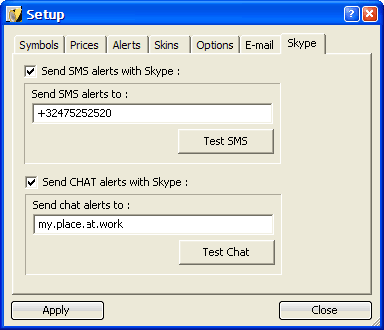
Sending SMS Messages using Skype
To be able to send SMS alert messages to a mobile phone you will first have to activate this function by clicking the checkbox next to the "Send SMS alerts with Skype" option. Below "Send SMS alerts to" you will have to specify a valid phone number (including the country code of the phone number). We also strongly advise to click on the "Test SMS"-button to test if all works fine. If not, you should receive an error message very soon. One of the main problems could be that Skype is not yet installed on your computer or that you don't have enough credits on your Skype SMS account. Eeach time you send an SMS, Skype will charge you 1 SMS credit. More information on buying credits you will find on www.skype.com
AlertTAPE access to Skype
The very first time AlertTAPE uses Skype to send out a message, Skype will ask you if AlertTAPE
is allowed to send messages using your Skype account :
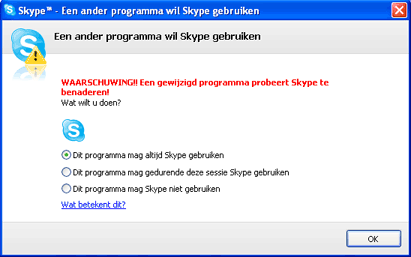
This is a Skype security so that only some selected programs can use this feature
and is only shown one time.
You should select the first option so AlertTape can ALWAYS use Skype to send out
alert messages. If not AlertTape will NOT be able to send out messages using Skype !
Sending Chat Messages using Skype
To be able to send out Chat alert messages to another Skype account you will have to activate this function by clicking the checkbox next to the "Send CHAT alerts with Skype" option. Below "Send chat alerts to" you will have to specify a valid Skype user. (This username can also be found in the properties dialog of this user in Skype. This is usualy NOT the name which is displayed for this user.) We now strongly advise to click the "Test Chat"-button to test if everything works as expected. If not, you should receive an error message very soon. If it is the first time you access Skype this way, please look at the warning above.
Sending these Chat alerts to a (second) skype account is absolutely free (no credits needed) and very easy to use. Even if the receiver is not online he will receive the message the next time he logs on to Skype. If you are planning to send the chat messages to yourself (on another location e.g. at work) you will have to create a second Skype account : the home account is used to send the message and the second account will be used to receive the message at the remote location. (Logging on to your main account on a different location will log off your home account and so Alerttape will not be able to send out it's alerts.)